Impact
Scale it · WorkShift

Assess which roles AI should automate, and which to augment or protect.

WorkShift analyzes roles and tasks to identify where AI could improve productivity, reduce costs, and free up capacity through automation and augmentation—and where human expertise should remain.

Provide a standard export of anonymized workforce data. WorkShift runs the analysis and delivers the findings in an interactive application for your team to review and model scenarios.

For HR, Operations and Finance leaders shaping AI and workforce plans.
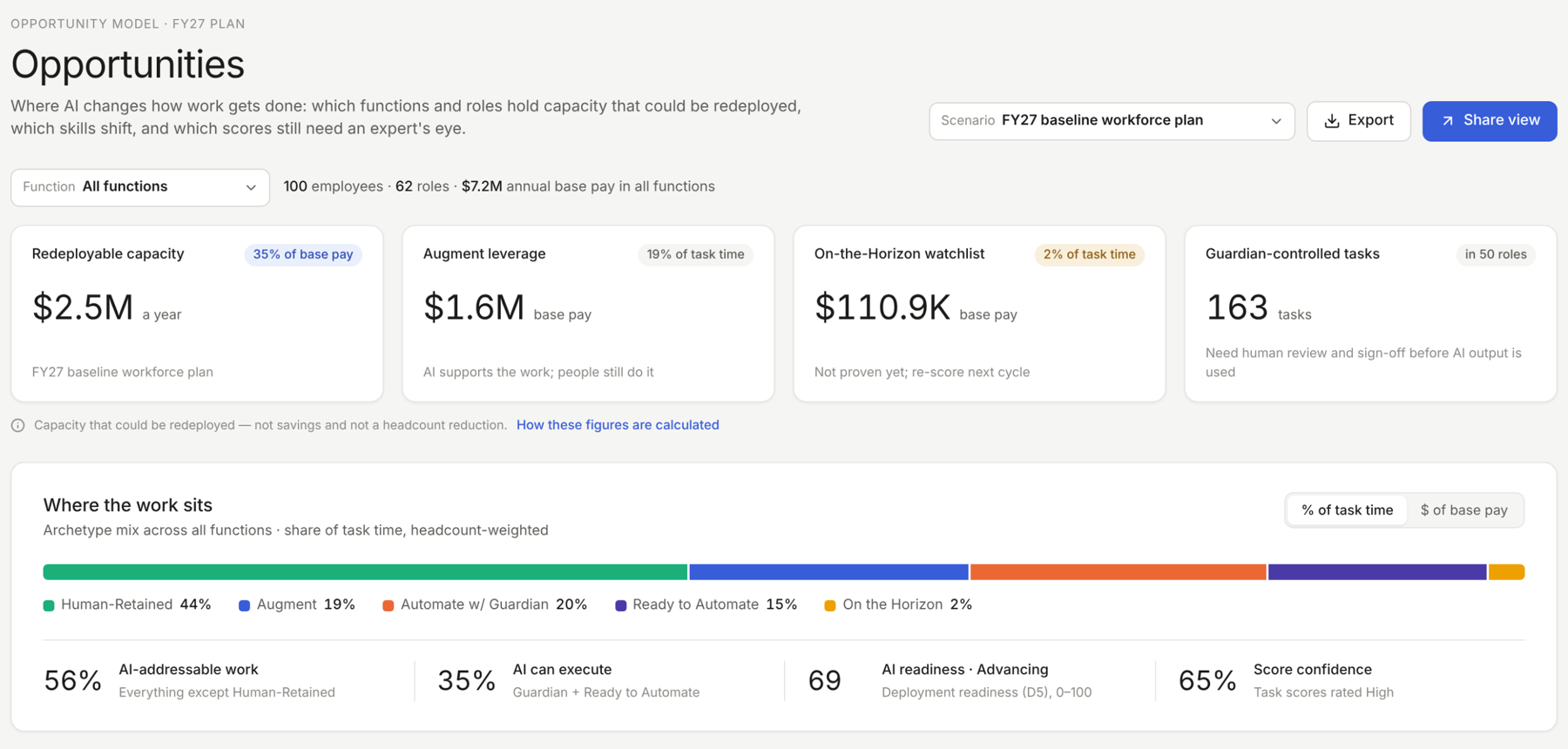
WorkShift Opportunities view: redeployable capacity of $2.5M a year, augment leverage, an on-the-horizon watchlist, and where the work sits across five categories.
Illustrative sample data. The $2.5M shown represents the estimated labor-cost equivalent of potentially released capacity, not realized savings.
One workforce exportStandard Anonymized HRIS Dataset
Every task, five lensesWith visible analytical reasoning
Five transformation pathsFrom human-retained to ready to automate
What you get

A clear view of the opportunities based on your specific workforce roles and skills.

Financial opportunityIdentify the potential labor-cost savings or additional capacity attributable to AI-enabled work.
Workforce decisionsUnderstand which work to protect, augment or automate, with implications for staffing, human oversight and organizational change.
Skills and actionsIdentify capabilities to develop, skills that may become less important and opportunities to evaluate through an actionable workforce plan.
Interactive analysisExplore opportunities by business unit, function, role or task. Review the reasoning, model alternatives and turn selected opportunities into initiatives with owners, timelines and status.
When to use it

Before making workforce changes, see where AI fits best— and where it doesn’t.

Build an AI workforce planIdentify which work AI could change, the potential financial opportunity and where human capabilities remain essential.
Prioritize AI pilots and investmentsCompare opportunities based on potential savings, business value and implementation considerations.
Prepare for workforce and budget decisionsUnderstand the implications for roles, staffing costs and skills before committing resources.
Revisit opportunities as AI improvesReassess what AI can do and which changes make financial and operational sense.
How it works

Four steps. WorkShift does the analysis, you make the call.

Step 1Analyze your workforce dataStart with an anonymized Workforce Dataset.
Step 2Map roles and tasksEstablish a consistent view of the work performed across your organization, using standard occupation and task information.
Step 3Evaluate AI opportunitiesAssess tasks across five lenses to identify potential automation, augmentation, workforce capacity and associated financial opportunities.
Step 4Review and model alternativesExplore the findings, challenge assumptions and compare approaches before deciding what to change.

Configured with your data

Use WorkShift’s job role and skills mapping or provide your job descriptions and skills information to make the analysis more specific to your organization.

The WorkShift 5D Scoring Model

Five lenses, every task.

WorkShift evaluates what AI could do, what it should do and the conditions under which changing work may be appropriate.

Each assessment includes reasoning your team can examine and challenge.

The five analytical lenses

Lens 1AI CapabilityHow much of the task can available AI perform?
Lens 2AutonomyWhat degree of AI independence is appropriate?
Lens 3Human CriticalityWhere are human judgment, accountability or relationships essential?
Lens 4RiskWhat could happen if the output were wrong or the process failed?
Lens 5ReadinessIs the technology dependable enough for the intended use today?

Five transformation paths

Path 1Human-RetainedHuman accountability or expertise remains essential. Consider AI tools that support people without replacing their judgment.
Path 2AugmentAI assists with the work while people direct, review and remain responsible for the results.
Path 3Automate with GuardianAI can perform substantial portions of the work, with human oversight where errors could have significant consequences.
Path 4Ready to AutomateTasks are potential candidates for automation, subject to appropriate quality controls and implementation review.
Path 5On the HorizonPromising opportunities that require stronger AI capabilities, evidence or organizational readiness.

The five paths distinguish technical potential from appropriate action. Your team determines which opportunities are worth pursuing.

Why you can trust it

Move fast without losing control.

WorkShift uses a structured analytical method, makes its reasoning visible and identifies where human judgment and oversight matter.

  • ✓Reasoning you can inspectExamine task-level scores, recommended paths and supporting rationale.
  • ✓Human-accountability safeguardsIdentify work requiring professional judgment, oversight or human responsibility.
  • ✓Uncertainty made visibleReview confidence assessments and flags for complex, uncertain or high-consequence tasks.
  • ✓Your team decidesChallenge assumptions, evaluate alternatives and determine which changes to pursue.

WorkShift analyzes roles and tasks to support organizational planning—not to evaluate individual employees. AI Use Statement →
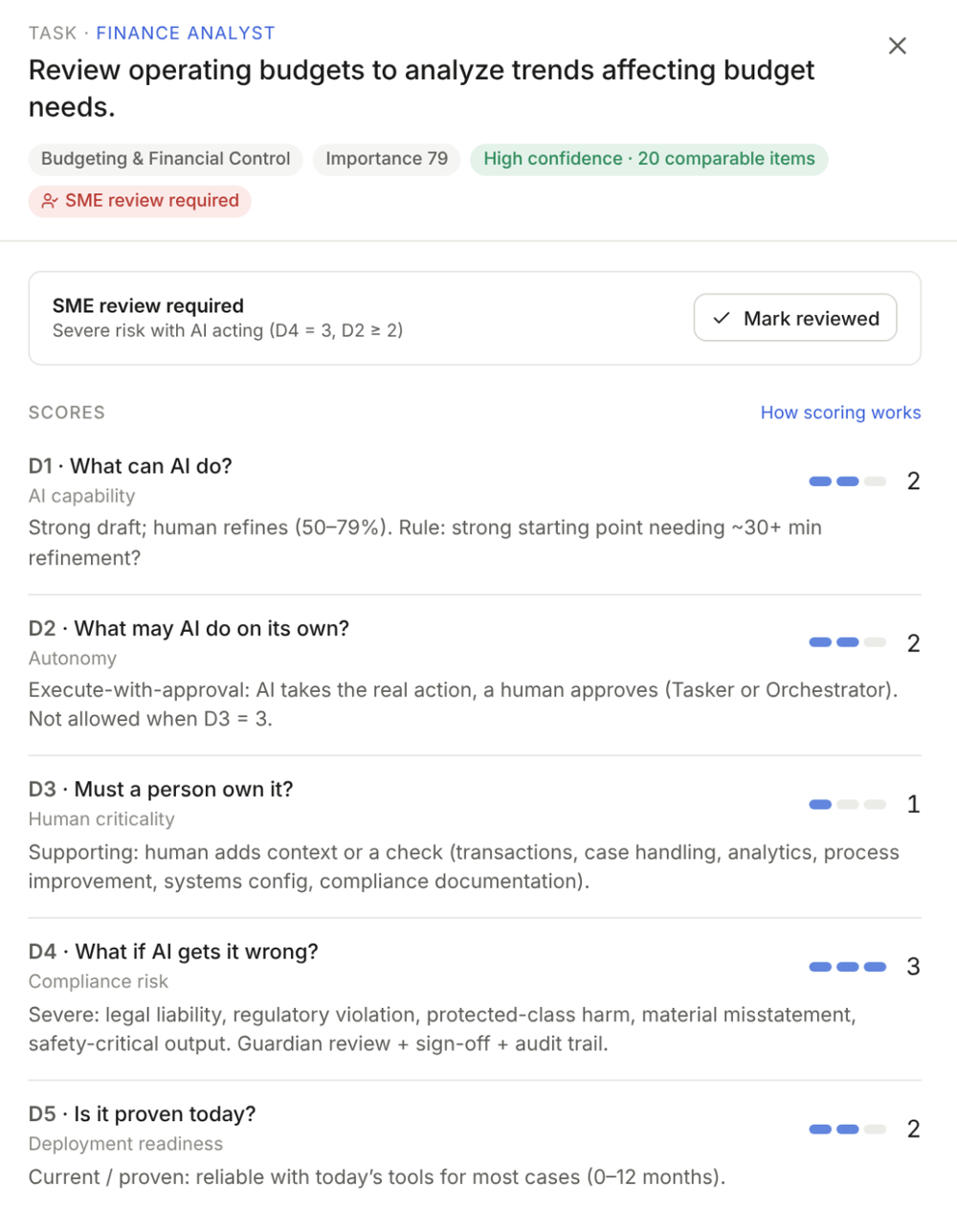
A task scored on five questions, with its reasoning and an expert review flag.
How it fits

What AI can do is only half the decision.

WorkShift identifies where AI could change work. First Signal and Rapid Impact can provide current workforce-to-business impact evidence to guide decisions on which opportunities could provide the most positive results and which ones may have unintended performance consequences.

Each product can be used independently.

Business contribution meets AI potential

ProtectWork that drives business results, where automation could introduce unacceptable risk.
AugmentValuable work where AI can help people improve performance.
WatchWork with limited current AI opportunity or an uncertain business case.
AutomateWork suitable for automation where the operating benefits justify the change.
Your data

One anonymized roster. Clear limits on what happens to it.

Before you request a trial, here is what WorkShift needs, how it is processed and how long it is kept.

What WorkShift needsOne workforce roster with fields such as job title, job family, business unit, level and base pay. Job descriptions and cost data are optional. The roster is designed to contain no names or employee IDs.
How it is processedGuided AI models map your roles to standard occupations, break them into tasks and score each task, based upon O*NET-SOC taxonomy and content model. The roster is processed by Anthropic under terms that do not allow it to be used to train models. WorkShift looks at roles, not individual people.
How long it is keptWe keep the uploaded roster file for 30 days. Data in the WorkShift application is kept for 60 days after your subscription ends, then deleted.
What it is never used forYour data is never used to train AI models, build benchmarks or combine with other customers’ data. WorkShift is not for screening, ranking or making decisions about individual employees.

Pay data tied to a role can still relate to individuals, so confirm you have a lawful basis for providing it. Details are in our Privacy Policy and AI Use Statement.

Review the data request with usDownload the Data and Security Brief (PDF, 1 page) →See pricing →
Plans and pricing

Priced to the scope of your analysis.

Start with one workforce scan and 30 days of access, or choose an annual plan with the flexibility to scan as needed or five scans included.

30-Day Trial30 days of application access. 1 workforce scan.
$795
Flat, one-time price
  • 30 days of access to the WorkShift application
  • Pricing is for up to 2,000 employees

More than 2,000 employees? Custom pricing — Talk to us.

Annual FlexFull-year application access. Scans as you need them.
$595 / month
Annual commitment, billed monthly
Or $5,950 / year prepaid — Save $1,190
Workforce scans billed separately at $1 per employee per scan.
  • 12 months of access to the WorkShift application
  • Pricing is for up to 2,000 employees

More than 2,000 employees? Custom pricing — Talk to us.

Annual BundleFull-year application access. Includes 5 scans.
$895 / month
Annual commitment, billed monthly
Or $8,950 / year prepaid — Save $1,790
Five workforce scans included. Reduced pricing available for additional scans.
  • 12 months of access to the WorkShift application
  • Pricing is for up to 2,000 employees

More than 2,000 employees? Custom pricing — Talk to us.

Example — 1,000 employees
Annual Flex$595/month with an annual commitment, or $5,950 prepaid annually.Each workforce scan costs $1,000.
Annual Bundle$895/month with an annual commitment, or $8,950 prepaid annually.Five workforce scans included at no additional charge.

Both annual plans include 12 months of interactive WorkShift application access.

Scans and application access
Workforce scans

A scan creates or refreshes the workforce analysis using your workforce information and the WorkShift methodology.

Annual Flex customers purchase scans as needed. Annual Bundle includes five scans per year.

Interactive application access

Throughout your access period, explore findings, review task-level reasoning, model alternatives and manage initiatives.

Ordinary use of the interactive application does not consume a workforce scan.

Common questions

Common questions.

What data do we need?

An anonymized Workforce Dataset containing the information needed to describe roles, organizational structure and compensation. WorkShift includes a proprietary role-skills mapping inventory. Available organization-specific job descriptions and skills information can be accommodated to enhance results.

Does WorkShift calculate actual savings?

WorkShift identifies potential AI workforce opportunities and their financial implications. Actual savings depend on which changes can be implemented and whether they reduce expenses, free up capacity, or produce other measurable business benefits.

Does WorkShift decide which roles to automate?

No. WorkShift evaluates tasks, identifies potential transformation paths and makes its reasoning visible. Your leadership team determines which changes to pursue.

Does WorkShift evaluate individual employees?

No. The analysis focuses on roles, tasks and skills, not individual employee evaluation.

AI Use Statement →

Bring your AI workforce question. We’ll show you how WorkShift approaches it.

Book a DemoSee pricing